Don't trust your old benchmarks: a weekend of testing on the Intel Arc B70
A Saturday of testing on the Intel Arc B70 produced 8× throughput on Qwen3.6-35B-A3B. Mesa 26.1, backend choice, and ubatch tuning.

Update, 31 July 2026. Two things in this post have since been corrected by a follow-up on context decay. The
matrix cores:device line is not a reliable indicator of the fast Vulkan path — current llama.cpp builds reportKHR_coopmaton hardware that used to reportNV_coopmat2, at identical throughput. And theq4_0KV cache recommended below costs you roughly half your generation speed past 16K of context; on the SYCL backend,f16KV holds up far better at depth.
A few weeks ago I wrote about running local AI agents on my own hardware — the argument that the executor model handling your API keys should live on infrastructure you control, with a frontier model doing the planning from outside. That post was about the architecture. This one is about the hardware running underneath it, and what happened when I spent a Saturday actually testing what’s currently on the box.
Here’s the punchline first.
| Workload | Previous benchmarks | End of Saturday | Multiplier |
|---|---|---|---|
| Prefill (single-stream) | 133 t/s | 1,824 t/s | 13.7× |
| Decode (single-stream, tg128) | 45 t/s | 76 t/s | 1.7× |
| 8-stream concurrent aggregate | ~78 t/s | 624 t/s | 8.0× |
| Wall-clock per Hermes-shaped call (8K + 1K, baseline extrapolated) | ~82 s | 22 s | 3.8× |
Same Intel Arc Pro B70. Same Qwen3.6-35B-A3B Q4_K_M quant. Same llama.cpp build. No money spent. Four to six hours of work over a Saturday, most of it spent testing paths that turned out not to be the answer. The thing that moved most of those numbers was a ten-minute upgrade I almost didn’t run.
The takeaway is the title of this post. If you tuned and benchmarked a local LLM stack a couple of months ago, the numbers from those benchmarks are probably wrong. Mine were.
The big lever was the graphics drivers, not the inference engine
I’ll back up a step. I run Qwen3.6-35B-A3B on a single Intel Arc Pro B70 via llama.cpp, OpenAI-compatible API, called from other machines on my network. The bottleneck I assumed I had was prefill — Vulkan on Battlemage is known to leave performance on the table on the prompt-processing side compared to Intel’s native SYCL backend.
So the obvious lever was switching backends. SYCL is the Intel-native compute API; on paper it should extract more from the silicon. I spent most of Saturday building llama.cpp against oneAPI’s DPC++ compiler, which is its own adventure I’ll get to.
What I missed, and what your intuition might miss too, is that the actual lever was sitting upstream of llama.cpp entirely.
I’m on Manjaro 26.0.4. Periodically I run pacman -Syu to keep things current, but I’d been deferring it for a few weeks. What I didn’t realize was that Mesa — the open-source graphics driver stack that llama.cpp’s Vulkan backend talks to — had shipped a 26.1 release in May that quietly turned on a new cooperative-matrix extension for Intel ANV.
Cooperative matrix is what llama.cpp uses to do its matrix multiplications efficiently on the GPU. There are two flavors in the Vulkan world: KHR_coopmat (the older standard) and NV_coopmat2 (a newer, richer extension originally written by NVIDIA but multi-vendor by spec). Up through Mesa 26.0 my B70 was advertising KHR_coopmat to llama.cpp. After Mesa 26.1, the same hardware advertises NV_coopmat2.
That single device-line change roughly doubled my Vulkan decode throughput on the same model with the same build of llama.cpp. (Since writing this I’ve found the label itself is not dependable — see the update note above.)
Before:  matrix cores: KHR_coopmat
After:   matrix cores: NV_coopmat2
Phoronix had actually tested this exact transition in their Linux 7.1 benchmark roundup on the B580 — Battlemage’s smaller sibling. Their finding for llama.cpp specifically was striking: the new kernel did essentially nothing for Vulkan throughput, but the Mesa 26.1 jump produced meaningful speedups on text generation. The kernel was the headline; Mesa was the lever. I had it backwards.
Total time from “I should probably update” to “let me check the new numbers” was about ten minutes. sudo pacman -S mesa intel-compute-runtime vulkan-intel and rerun the bench. Decode went from 38 t/s single-stream to 76. Prefill on long prompts climbed too. Aggregate throughput at my default four-slot agent config went from ~340 t/s to ~475.
That’s lever number one, and it’s the biggest single thing I did all weekend. It took ten minutes and I almost didn’t bother.
What testing SYCL actually told me
The SYCL detour was not wasted, but it didn’t produce the answer I expected, and that’s worth writing about because it’s the kind of thing you only learn by actually trying.
The hypothesis was: SYCL extracts more from Battlemage than Vulkan, especially on prefill. The procedure was: install Intel’s oneAPI base toolkit (DPC++ compiler, Level Zero runtime), build a second copy of llama.cpp with -DGGML_SYCL=ON -DGGML_SYCL_F16=ON, benchmark both backends side-by-side.
The build itself ate most of the day. SYCL compiles are memory-hungry, and trying to do one at full parallelism on a 32 GB machine while my desktop was still running crashed it. Hard reset, recover over SSH, retry with conservative settings. Twenty-five minutes later it built clean.
Tip for anyone doing this: build over SSH, drop parallelism to four, and skip the web UI target. The 32 GB headroom you’d expect isn’t actually there during a SYCL compile.
Once SYCL was built and working, the bench data told an unambiguous story — but not the one I’d predicted.
Single-stream, SYCL won decode by 38% on the MoE (76 vs 38 t/s, pre-Mesa). At four parallel slots — my default agent configuration — Vulkan won aggregate decode by 27%. At eight slots Vulkan extended the lead further. SYCL’s per-slot decode plateaued almost immediately as I added concurrency; Vulkan scaled close to linearly up through eight streams.
Then the Mesa upgrade happened, and single-stream Vulkan decode doubled. After Mesa 26.1, Vulkan was faster than SYCL at every concurrency level I tested. The launcher I’d built that lets me pick backend per profile became, in practice, “always pick Vulkan.”
So SYCL is now a benchmark binary on my machine, not a production one. It’s the thing I’ll rerun a month from now to see whether Intel’s SYCL kernel work has caught up with what Mesa is doing on the Vulkan side. The PMZFX benchmark repository, which is the best public B70 dataset I know of, currently recommends SYCL over Vulkan for token generation based on a 2.2× advantage they measured. Their note:
SYCL generation is 2.2× faster than Vulkan on the same hardware. Don’t use Vulkan for B70 token generation.
True in April, on the pre-Mesa-26.1 stack. Not true now on a current Manjaro install. The data on their page is correct; the recommendation drawn from it is the thing that aged. That’s the version of “don’t trust your old benchmarks” that’s hardest to spot, and it’s a big part of why I’m writing this.
A model is not faster because it’s smaller
The other detour worth mentioning is the dense Qwen3.6-27B test. Qwen released a 27B dense model in late April that, on some coding benchmarks, beats their 35B-A3B MoE. Given that “smaller” usually correlates with “faster,” I wanted to know whether I should be running the dense model instead of the sparse one for agent workloads.
The answer on the B70 specifically is no, and the reason is bandwidth.
The B70’s GDDR6 memory runs at 608 GB/s. For decode (token generation), the dominant cost is reading the weights you need to compute the next token. The 35B-A3B MoE is sparse — it activates roughly 3B parameters per token, not the full 35B. Each decode step reads about 3 GB of weight data. The dense 27B model has no sparsity; every token reads all 27 GB. At the same memory bandwidth, the math is unforgiving.
What I measured on the same Vulkan-and-Mesa-26.1 stack:
| Model | Single-stream decode |
|---|---|
| Qwen3.6-35B-A3B Q4_K_M (sparse, ~3B active) | 76 t/s |
| Qwen3.6-27B Q4_K_XL (dense, all params active) | 20 t/s |
About 3.8× faster on the model that looks bigger on paper. The dense model is a real quality upgrade — Qwen tunes it specifically for coding — but on Battlemage you pay roughly 4× per token for that quality. For agent workloads where the model is producing real output, that’s a steep trade. For a task where one good answer beats four mediocre ones, maybe worth it. For my Hermes and Pi loops chewing through observations and tool calls, the MoE is the right pick.
This is one of those findings that’s structural to the hardware rather than to the software. Bandwidth-bound inference loves sparse architectures. NVIDIA cards with twice the bandwidth disguise some of this; on the B70 it’s unsubtle.
Honestly, it’s a disappointing finding. Part of the appeal of a 32 GB workstation GPU at this price is the flexibility to try whatever model you want — and if dense pays 4× per token on this hardware, you don’t really have that flexibility. The B70 is still the right card for what I’m doing right now, but if you’re an enthusiast looking to play with the full range of open-weight models, that’s not the deal you’re getting from this card today.
The third lever: —ubatch-size and reading the defaults
The last meaningful change was the smallest one. llama.cpp has a flag called --ubatch-size — the physical batch size used for prompt processing. The default is 512. I’d never touched it.
Worth knowing about: there’s a popular LocalLLaMA thread from earlier this year where someone on an AMD RX 9070 XT found that smaller ubatch values — specifically 64, matching the GPU’s L3 cache — gave them dramatically faster prompt processing. That post ranks well for ubatch tuning questions. It’s the only ubatch-tuning post that ranks well, so it’s where most people land when they look this up.
On Battlemage the answer is the opposite. I tested ubatch values of 512, 1024, and 2048 on the MoE. Prompt processing on a 2,048-token prefill went from 1,131 t/s at the default 512, to 1,478 t/s at 1024, to 1,824 t/s at 2048. Decode rate stayed within noise across all three. Pure prefill win, no decode cost.
The same change at four parallel slots — my actual production config — picked up another 14% on aggregate throughput. At eight slots, 19%. The gain compounds with concurrency because each slot’s prefill is doing the same proportional work.
It’s now a one-line addition to my launcher:
--ubatch-size 2048That’s it. No build change, no kernel change, no driver change. The reason this lever exists is that the llama.cpp default was tuned conservatively for a wide range of hardware including memory-tight cards. Battlemage has 608 GB/s of bandwidth that was sitting idle behind a too-small ubatch.
If you’re on a different GPU, the right answer may genuinely be smaller — see the AMD finding above. But on B70 switching to --ubatch-size 2048 picks up roughly 60% more prefill speed, and no benchmark you read on someone else’s hardware will tell you that.
This kind of work — choosing inference stacks and tuning local LLM hardware for real production use — is what I help CTOs and engineering teams work through. If you’re standing up local AI infrastructure and want a second pair of eyes on the architecture, reach out.
Where the stack actually sits now
After the three changes, I wanted to know where I stood relative to what the hardware can theoretically do. The math is straightforward.
The B70 has 608 GB/s of memory bandwidth. For sparse MoE decode where ~3.5 GB of weight + KV data has to be read per token, the theoretical maximum single-stream rate is about 608 ÷ 3.5 ≈ 174 t/s. I’m at 76. About 44% of theoretical bandwidth utilization on single-stream.
For eight-stream aggregate, where the dense weight reads are shared across slots and per-token effective bandwidth drops to roughly 1.7 GB, theoretical max is ~360 t/s. I’m at 176. About 49%.
For context, PMZFX’s published baseline before this weekend was around 31% — already a measured number, on the same hardware, just on an older userspace stack. NVIDIA CUDA on equivalent-bandwidth hardware typically hits 60-70%. The remaining 15-20 percentage points between where I am and where CUDA sits is the Intel SYCL/Vulkan kernel maturity gap. That’s not a knob I can turn from userspace. It’s the work happening in llama.cpp pull requests every few weeks.
What this means in practice: at the driver and library layer, the optimization phase is done. I’ve pulled the three real levers there are right now. Future gains come from upstream work I don’t control — new Mesa releases, new llama.cpp kernels, new oneAPI versions — and from re-running this exact testing procedure in a few months to capture whatever they’ve shipped.
The best current setup on a single B70 running Linux, on my hardware and my workload, with data to back every decision:
- llama.cpp Vulkan backend, current Mesa stable (26.1.x or newer), current intel-compute-runtime
- Qwen3.6-35B-A3B at Q4_K_M (UD-Q4_K_M from Unsloth — they patch the chat template)
--ubatch-size 2048in the launcher- q4_0 KV cache (q8_0 KV is slower on this hardware and the quality difference at this model size isn’t worth it)
--reasoning offserver-side, with interactive clients opting in per-request
For an agent profile specifically: four slots at 64K context each — 544 t/s aggregate. The 624 t/s in the headline table is the eight-stream stress test, the apples-to-apples comparison against my previous benchmark baseline.
The full benchmark data
Putting this here for anyone who wants the receipts. Every number below is from real llama-bench or llama-batched-bench runs on the same B70 over the weekend.
Mesa upgrade
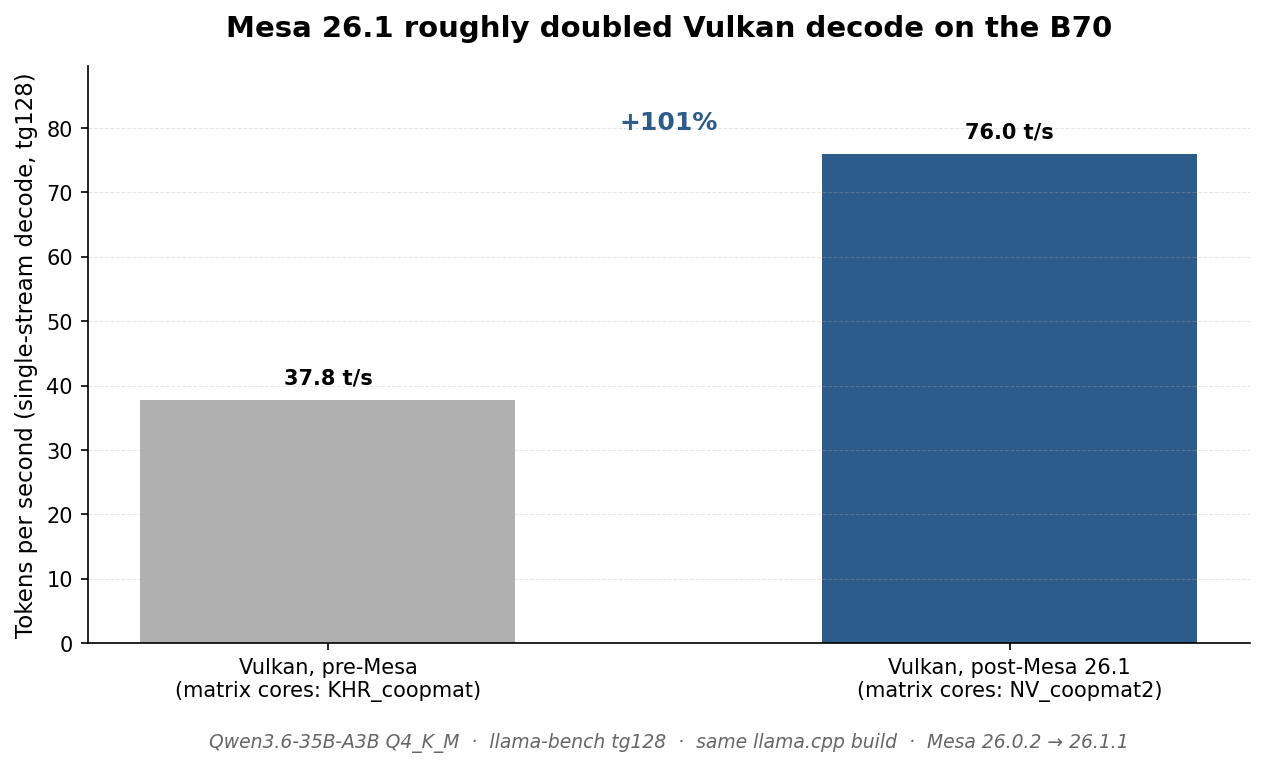
The simplest chart, the biggest impact. Same model, same llama.cpp build, same prompt — just a different Mesa version underneath. Decode roughly doubled. SYCL got smaller bumps from the matching intel-compute-runtime upgrade (+28% on pp2048, +4% on tg128), but Vulkan was the big winner.
Concurrency scaling: Vulkan vs SYCL
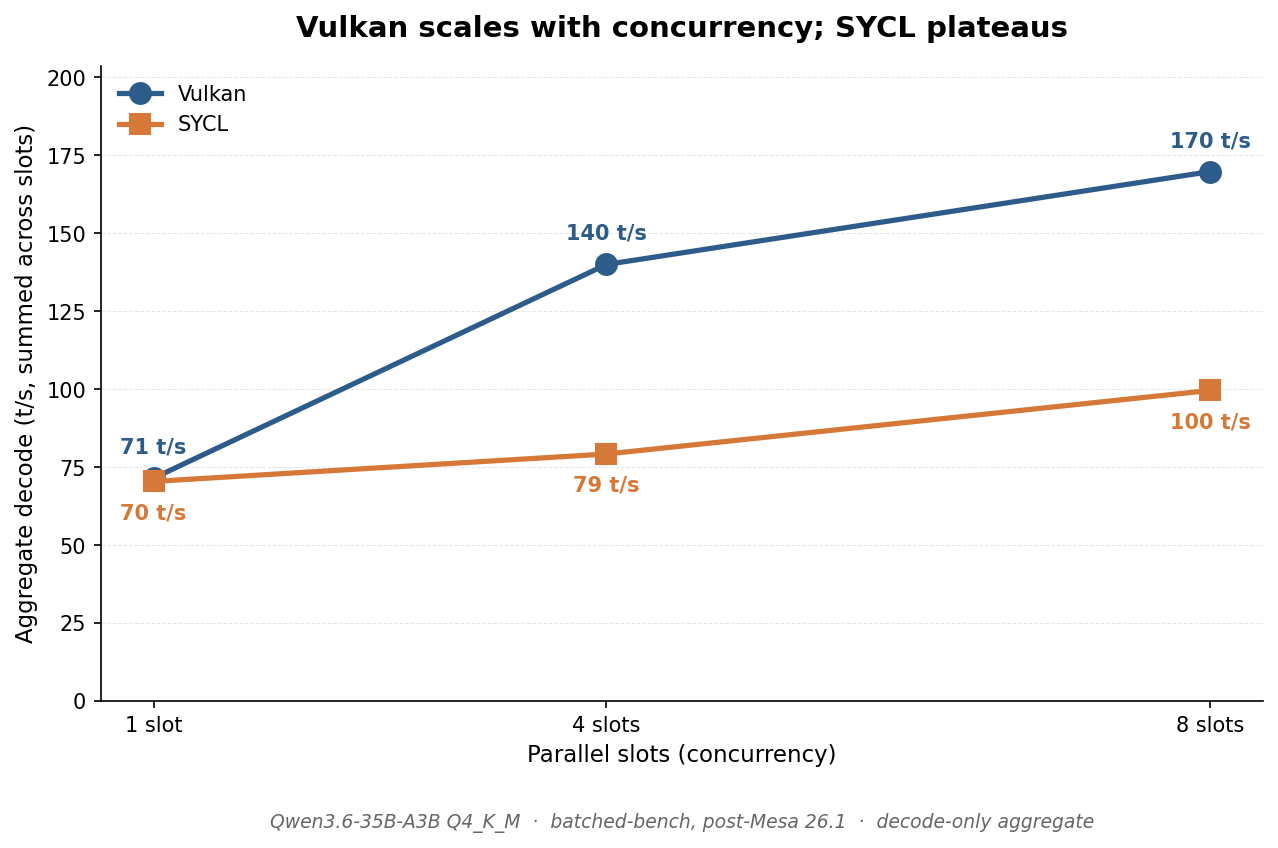
This is why Vulkan wins on the B70 right now. Both backends start at the same single-stream rate. As you add parallel slots — the way an actual agent workload looks — Vulkan keeps scaling and SYCL doesn’t. By eight slots Vulkan is 70% faster on aggregate decode. The reason is upstream: SYCL’s batched-decode kernels for Battlemage haven’t caught up to Vulkan’s coopmat path yet.
Ubatch tuning
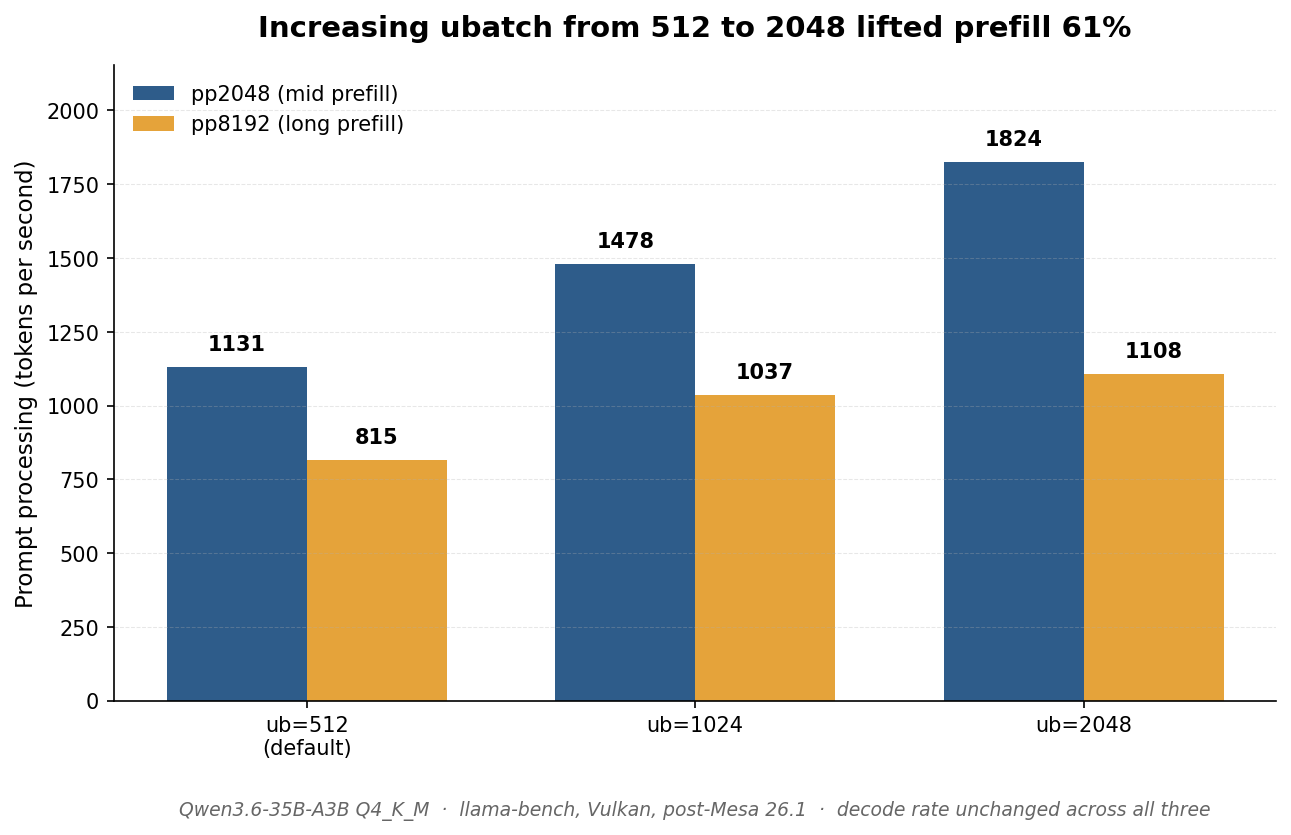
The third lever. Diminishing returns at very long prefill (pp8192 only gains 36% versus pp2048’s 61%), but no measurable decode cost at any ubatch I tested. This is a Vulkan-specific result and the opposite of the popular AMD finding that recommends smaller ubatch on the RX 9070 XT.
Sparse MoE vs dense
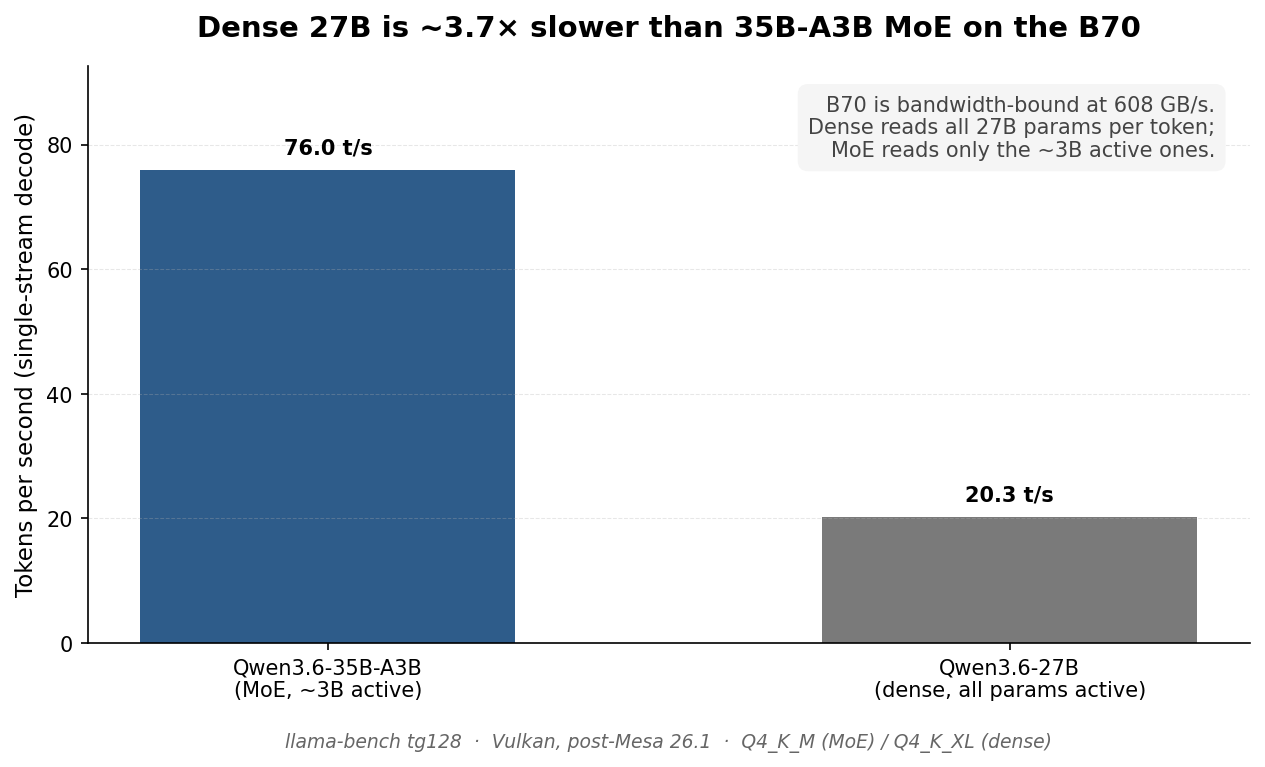
Structural finding, not a tuning gap. B70 is bandwidth-limited at 608 GB/s. Dense 27B reads all 27B params per token; the MoE only reads the ~3B active ones. The bandwidth math fixes the ceiling — you can’t tune your way out of it. If model architecture matters to you on this hardware, sparse beats dense for throughput at the same VRAM budget.
Cumulative result across the weekend
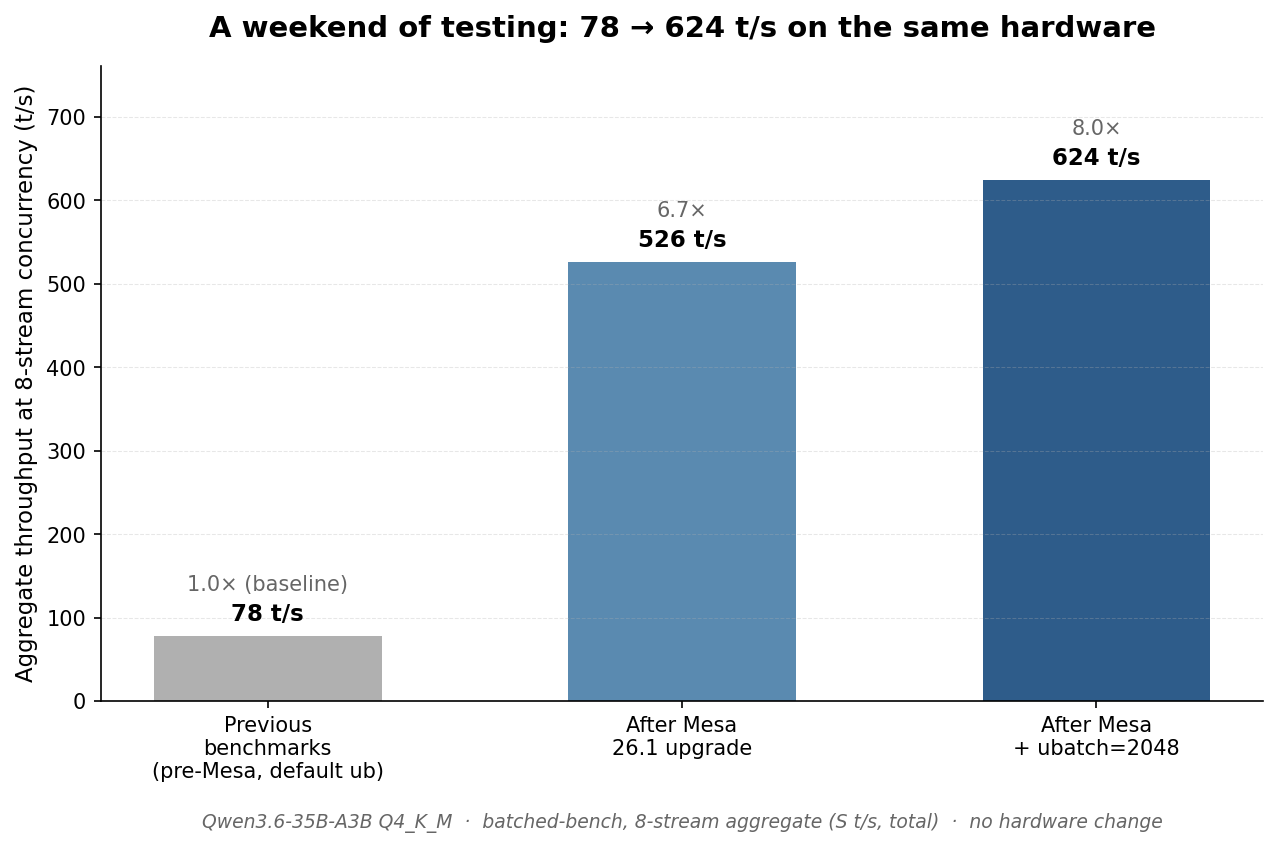
The headline. Three changes, no hardware swap, 8× aggregate throughput at the concurrency level my previous benchmarks were captured. Most of the gain — 6.7× of the 8× — was already there waiting for me in the Mesa upgrade. I just didn’t know.
The consolidated numbers
For anyone who wants to compare against their own setup, here’s everything in one table.
Qwen3.6-35B-A3B Q4_K_M (MoE), all values in t/s:
| Test | Vulkan pre-Mesa | Vulkan post-Mesa | Vulkan + ub=2048 | SYCL post-Mesa |
|---|---|---|---|---|
| pp512 | 1,288 | 1,225 | — | 939 |
| pp2048 | 1,098 | 1,172 | 1,824 | 979 |
| pp8192 | 796 | 938 | 1,108 | 863 |
| tg128 (single-stream) | 37.8 | 76.0 | — | 77.3 |
| 8-stream decode aggregate | — | 170 | 176 | 100 |
| 8-stream total aggregate | — | 526 | 624 | 350 |
Dense 27B comparison (post-Mesa, single-stream):
| Model | Vulkan tg128 | SYCL tg128 |
|---|---|---|
| Qwen3.6-35B-A3B Q4_K_M (MoE, ~3B active) | 76 t/s | 77 t/s |
| Qwen3.6-27B Q4_K_XL (dense, all params) | 20 t/s | 19 t/s |
What this means for anyone running local AI
The thing I keep coming back to is that the numbers from my previous benchmarks — captured from real bench runs on real hardware with reasonable methodology — were not slightly wrong. They were wrong by integer multiples. The 8× improvement on my agent loop didn’t come from any one heroic optimization. It came from the upstream stack changing underneath me while I wasn’t looking.
This is what makes Battlemage on Linux specifically frustrating to write about in 2026. The hardware is good. The drivers are improving fast. The llama.cpp Vulkan and SYCL backends are both under active development. There are pull requests landing every few weeks that change what’s actually fast on this card. A benchmark post from April — including the otherwise excellent PMZFX repository, Phoronix’s review, and the Medium walkthroughs people land on when they Google their way through setup — is not lying about anything. The numbers were correct when they were captured. The stack has just moved.
If you bought a B70 in April and haven’t re-run your benchmarks since, you’re probably leaving close to half your throughput on the table. Not because you did anything wrong. Because none of us are paying close enough attention to a 26.1 minor release of a graphics driver to realize it’s the biggest single LLM performance event of the quarter.
I’m going to keep doing this weekend exercise. Next time I sit down to test, I’ll probably find something else I missed. That’s the actual posture this hardware rewards right now — not “set it up once and ship,” but run the bench again every couple of months and see what the upstream stack did. The drivers and libraries underneath llama.cpp on Battlemage are genuinely moving that fast.
If you’re standing up local AI on hardware you own and you’d rather not learn this the way I did — by accident, on a Saturday, two months late — the architecture and operating discipline around a moving stack is the kind of thing I work through with companies as a fractional CTO. The hardware is one piece of it; knowing what to re-test and when is the other. Reach out if it’s useful.
FAQ
Is Vulkan faster than SYCL on the Intel Arc B70? As of Mesa 26.1 and current llama.cpp, yes — for Qwen3.6-35B-A3B specifically, Vulkan wins on both single-stream and concurrent decode. This is the opposite of what was true in April. Older guides recommending SYCL for token generation are working from pre-Mesa-26.1 data. Re-test on your own hardware before committing.
How do I update Mesa for better llama.cpp performance?
On Arch and Manjaro it’s sudo pacman -S mesa intel-compute-runtime vulkan-intel. On Ubuntu the version you want lives in oibaf’s PPA or the stable archive depending on release. After the upgrade, compare your actual throughput against the numbers above. Do not rely on the matrix cores: line to confirm it — recent llama.cpp builds report KHR_coopmat on hardware that previously reported NV_coopmat2, with no performance difference.
What kind of tokens-per-second can I expect on the B70 for Qwen3.6-35B-A3B?
On my current setup, 76 t/s single-stream decode, ~1,800 t/s prefill at pp2048, and ~544 t/s aggregate throughput at four parallel slots. Numbers assume Vulkan backend, Mesa 26.1+, --ubatch-size 2048. Earlier published numbers in the 38-55 t/s range are pre-Mesa-26.1 and are now low.
Should I buy an Intel Arc B70 or an RTX 5090 for local LLM work? Different trade-offs. The B70 is ~$1,000 with 32 GB of GDDR6. The 5090 has 32 GB of faster GDDR7 but currently sells in the $2,700-$4,000 range thanks to the ongoing memory crisis — call it three to four times the B70’s street price right now. The CUDA ecosystem is more mature, decode is faster on equivalent-class workloads, and you’ll spend less time fighting the stack. The B70 is the right pick if VRAM-per-dollar matters and you can tolerate a moving software target. I run the B70 because I like watching the ecosystem mature and I value the dollars I didn’t spend. That’s a personal call, not a universal recommendation.
Does speculative decoding or MTP help on Qwen3.6-35B-A3B? Not meaningfully on sparse MoE models, on this or any hardware. The structural reason is that each drafted token activates different experts, so verifying drafts can’t amortize compute across tokens the way it does on dense models. Multiple independent benchmarks confirm net-negative throughput across consumer and datacenter GPUs. The headline gains people see from MTP are on dense models. Skip it for sparse MoE workloads.
How often should I re-run my own benchmarks?
More often than feels natural. I’d do it any time you update llama.cpp, any time Mesa or your compute runtime gets a minor version bump, and any time a new release of your model family ships. The whole point of this post is that I let about two months elapse between checks and that was enough for my numbers to be wrong by 7×. The cadence I’m settling into is “rerun the same llama-bench command at every Mesa release.”